
Qdots WhatsApp Cloud · Official WhatsApp Business API
Reach customers where they already are.
Send order updates, reminders and offers on WhatsApp, reply to every customer from one shared inbox, and automate the conversations you have every day. Built on Meta's official WhatsApp Cloud API.
- Official Meta API
- Utility & marketing messages
- Shared team inbox
Features
One platform for every WhatsApp conversation
From the first message to repeat orders: alerts, campaigns, support and automation.
Connect your number in minutes
Guided Meta signup to connect your business number, with a sandbox to test first.
Templates with approval
Build utility, marketing and authentication templates, preview them and track Meta approval.
Campaigns that convert
Send offers and updates to segments of opted-in customers and track delivery, reads and clicks.
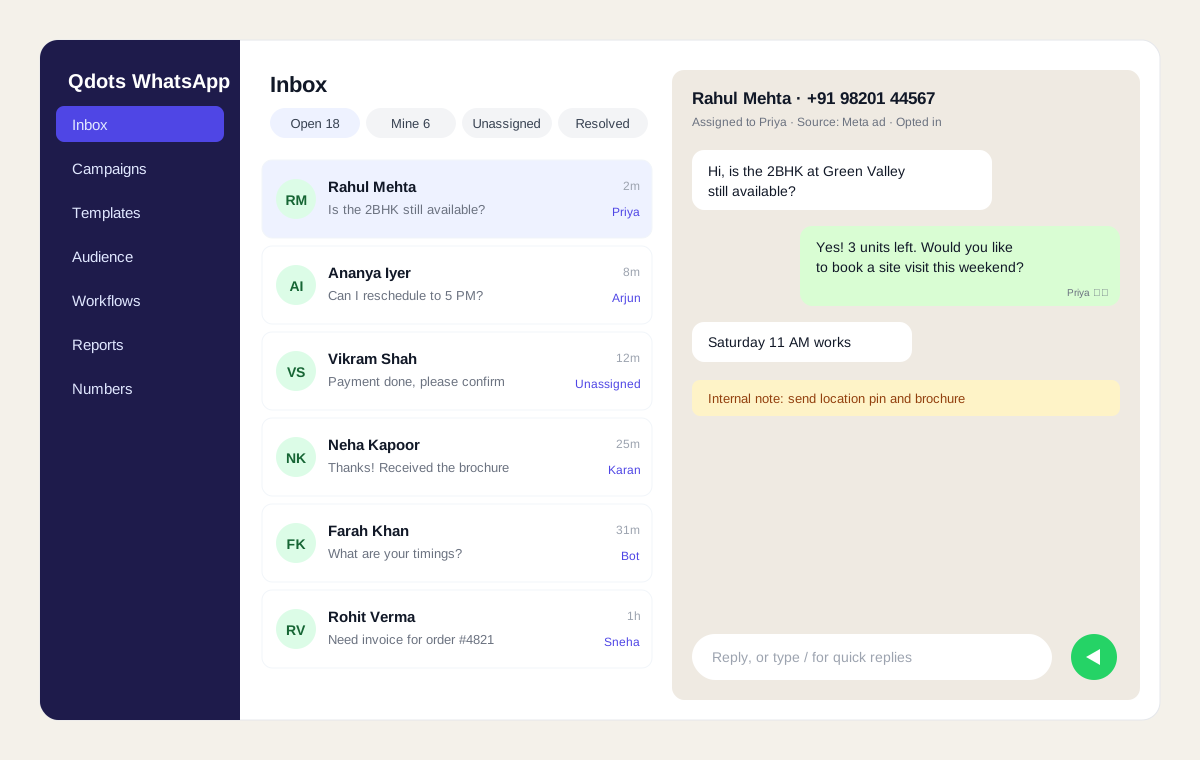
Shared team inbox
Every chat in one inbox with assignment, internal notes and quick replies.
Flows, workflows and auto-replies
Answer common questions, collect details and route chats automatically, 24×7.
Store and payment integrations
Connect Shopify or WooCommerce for order updates and cart recovery, and share Razorpay payment links.
Utility
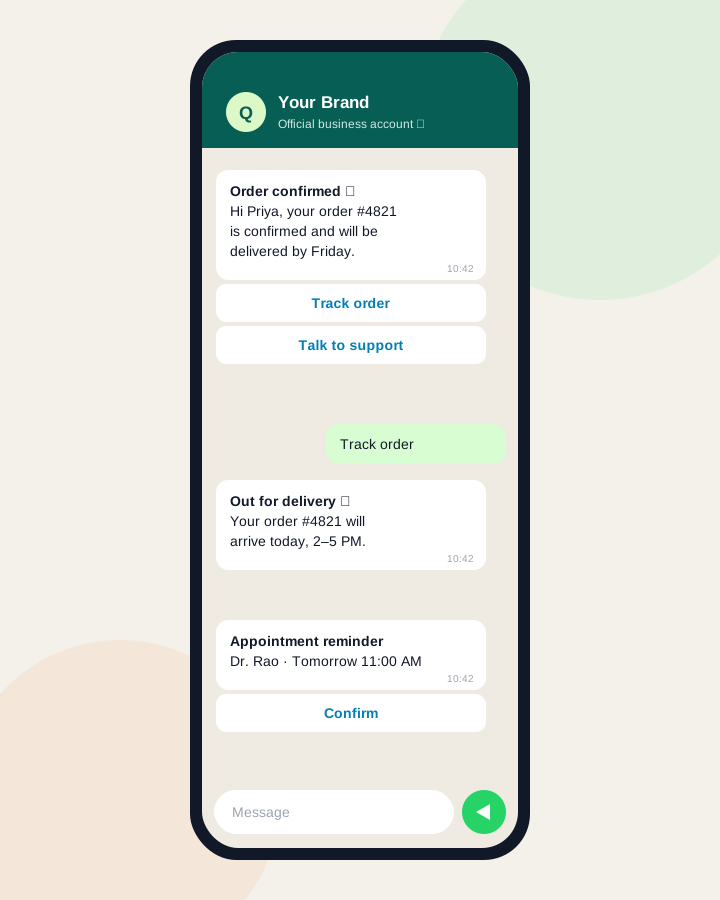
Utility messages customers actually read
Order confirmations, delivery updates, appointment reminders and payment alerts arrive on the app your customers check most.
- Trigger messages from your store, CRM or any system through the API
- Buttons for track order, confirm, reschedule or talk to support
- Delivery, read and reply status for every message
- Webhook events so your systems know what happened
Marketing
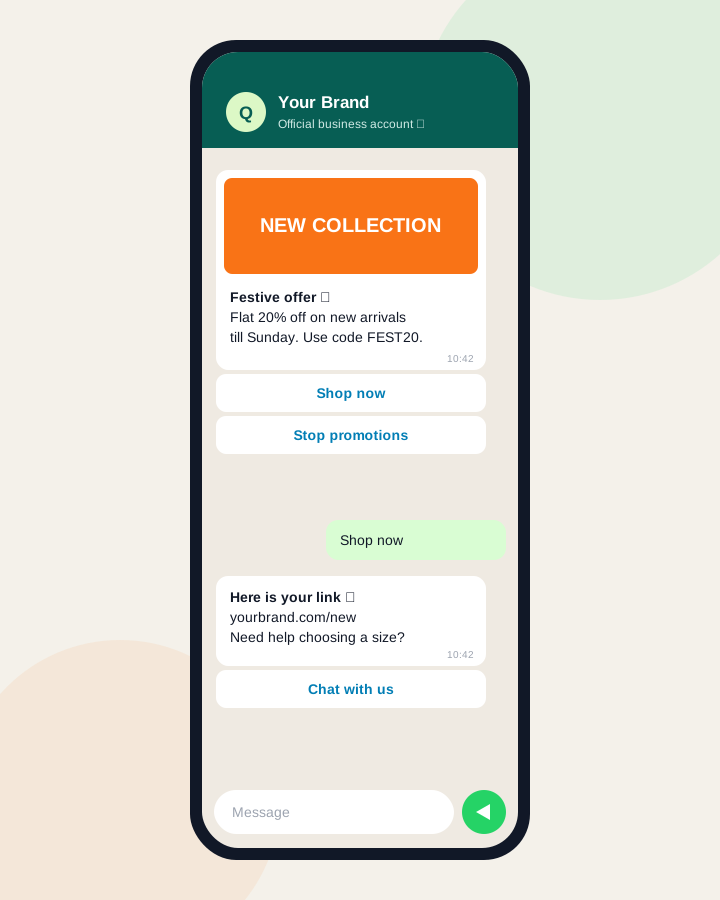
Marketing campaigns that respect consent
Send festive offers, launches and back-in-stock alerts to customers who opted in, and see what each campaign earns.
- Audience with consent tracking, segments and imports
- Rich templates with images, offers and buttons
- Schedule campaigns and send in batches within your messaging limit
- Reports on delivered, read, clicked and replied
Inbox
Every customer chat, one shared inbox
Your whole team replies from one WhatsApp number, without sharing a phone.
- Assign chats manually or automatically
- Internal notes and quick replies
- Auto-reply outside business hours
- AI-assisted replies and template writing
How it works
Go live in four steps
Step 1
Create your free account
Sign up with your work email and verify it.
Step 2
Connect your WhatsApp number
Follow the guided Meta signup, or try the sandbox first.
Step 3
Create templates
Write your first utility or marketing template and submit it for approval.
Step 4
Send and reply
Send your first campaign or alert and answer customers from the team inbox.
Industries
WhatsApp for your industry
Ready-made ideas for the messages each industry sends most.
WhatsApp for
Ecommerce
Order confirmations, shipping updates, cart recovery and new-arrival campaigns.
WhatsApp for
Real Estate
Instant replies to property enquiries, brochures, site-visit reminders and launch offers.
WhatsApp for
Hospitals
Appointment confirmations, reminders, reports ready and visiting information.
WhatsApp for
Clinics
Booking confirmations, reminders, follow-up visits and health tips.
WhatsApp for
Education
Admission enquiries, counselling reminders, fee alerts and event updates.
WhatsApp for
Travel Agencies
Itineraries, booking confirmations, travel reminders and holiday offers.
WhatsApp for
Restaurants
Reservations, order updates, feedback requests and weekend offers.
WhatsApp for
Retail Stores
New arrivals, loyalty offers, billing receipts and store events.
WhatsApp for
Salons & Spas
Appointment booking, reminders, packages and festive offers.
WhatsApp for
Financial Services
Payment reminders, application status, documents and policy alerts.
WhatsApp for
Automobile Dealers
Test-drive bookings, service reminders, quotes and delivery updates.
WhatsApp for
Events
Registrations, tickets, reminders, venue details and post-event follow-ups.
Qubitdots products
Better together
Connect WhatsApp with our CRM and email products for one view of every customer.
FAQ
Frequently asked questions
Help & support
Need help with Qdots WhatsApp Cloud?
Send us your question and our team will reply within one business day (Mon–Sat, 9:30 AM – 7:00 PM IST). We can also help you set up your account, import data and connect your channels.
Get started